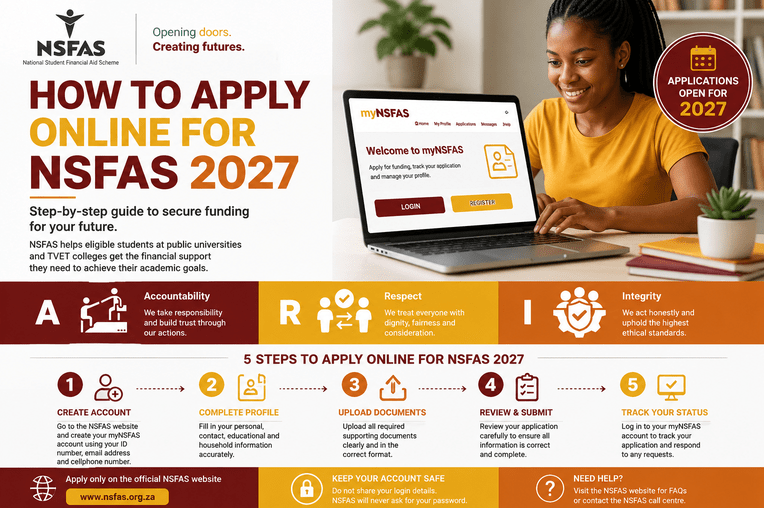
How to Apply NSFAS Online 2027-2028: A Complete Step by step Guide for Financial Assistance
How to Apply NSFAS Online 2027
If you’re planning to study at a public university or TVET college in South Africa during the 2027 academic year, applying for financial assistance through the National Student Financial Aid Scheme (NSFAS) could help make your education more affordable. Understanding the online application process before applications open can save you time, reduce stress, and improve your chances of submitting a complete application.
NSFAS provides financial support to eligible students who meet the funding requirements. The application process is completed online through the myNSFAS portal, allowing applicants to submit their information, upload supporting documents, and track their application from one secure account.
This guide explains how to apply online for NSFAS 2027, the documents you may need, common mistakes to avoid, and practical tips for completing your application successfully.
What Is NSFAS?
The National Student Financial Aid Scheme (NSFAS) is a South African government financial aid programme that helps eligible students pay for their studies at approved public universities and TVET colleges.
Depending on the funding rules that apply during your year of study, NSFAS funding may assist with expenses such as:
- Tuition fees
- Registration fees
- Learning materials
- Accommodation (where applicable)
- Living allowances
- Transport allowances (where applicable)
Funding policies are reviewed periodically, so applicants should always rely on the latest official guidelines.
Who Can Apply for NSFAS 2027?
NSFAS funding is available to students who satisfy the eligibility requirements published for the relevant academic year.
Applicants may include:
- First-time university students.
- First-time TVET college students.
- Returning students who continue to meet the funding requirements.
- Eligible South African citizens and others who qualify under current NSFAS policies.
Meeting the eligibility requirements allows your application to be assessed but does not automatically guarantee funding.
Before You Start Your Online Application
Preparing in advance makes the application process much easier.
Before visiting the myNSFAS portal, ensure you have:
- Your South African ID number or other accepted identification.
- Your own active email address.
- Your own cellphone number.
- A stable internet connection.
- Electronic copies of any supporting documents that may be required.
Using your own contact details is important because NSFAS communicates directly with applicants throughout the application process.
1: Create a myNSFAS Account
The first step is creating your personal myNSFAS account.
During registration you will generally:
- Enter your ID number.
- Provide your full name.
- Register your email address.
- Add your cellphone number.
- Create a secure password.
- Accept the terms and conditions.
After completing the registration process, verify your account if requested.
Keep your login details in a safe place because you will use the same account to submit your application, upload documents, and check your funding status.
2: Log In to Your Account
Once your account has been created successfully, sign in using your login credentials.
After logging in, you will be able to:
- Start a new application.
- View your profile.
- Upload supporting documents.
- Track your application progress.
- Receive important notifications.
3: Complete Your Personal Information
Carefully enter all requested information.
This may include:
- Personal details.
- Contact information.
- Home address.
- Educational information.
- Household information where required.
Ensure every detail matches your official records.
Incorrect information may delay verification or require additional documentation later.
4: Complete the Funding Application
Next, complete every section of the application form.
Read each question carefully before answering.
Avoid leaving required fields blank.
If you are unsure about any question, review the official NSFAS guidance before submitting your application.
5: Upload Supporting Documents
Depending on your circumstances, NSFAS may ask you to upload supporting documents.
These may include:
- Identity documentation.
- Proof of income where applicable.
- Declaration forms.
- Consent forms.
- Disability documentation where required.
- Other supporting documents requested during the application process.
The exact documents required depend on your personal circumstances, and the system will usually indicate what must be uploaded. Ensure every file is clear, complete, and readable.
6: Review Your Application Carefully
Before submitting your application, review everything carefully.
Confirm that:
- Your personal information is accurate.
- Your contact details are correct.
- Required documents have been uploaded.
- There are no typing errors.
- All compulsory fields have been completed.
Taking a few extra minutes to review your application can help prevent unnecessary delays.
7: Submit Your Application
Once you are satisfied that all information is correct, submit your application through your myNSFAS account.
After submission:
- Save your confirmation number.
- Keep copies of your uploaded documents.
- Monitor your account regularly for updates.
Do not submit multiple applications unless instructed to do so.
How to Track Your NSFAS Application
After submitting your application, you can monitor its progress through your myNSFAS account.
Your online account allows you to:
- View application status.
- Check whether documents have been received.
- Respond to additional document requests.
- Receive funding decisions.
Checking your application regularly helps you respond quickly if NSFAS requests further information.
Guidelines for a Successful NSFAS Online Application 2027
The following practical tips can improve your application experience:
- Apply early once applications officially open.
- Read all instructions before completing the form.
- Use your own email address and cellphone number.
- Keep your login details secure.
- Prepare documents before starting the application.
- Upload clear, readable files.
- Save confirmation messages.
- Check your myNSFAS account regularly.
Being organised from the beginning makes the entire process much smoother.
Applying online for NSFAS 2027 is an important step toward accessing financial support for your higher education. By preparing your documents early, creating your myNSFAS account, completing every section carefully, and monitoring your application after submission, you can improve your chances of a smooth application process.
Remember that application dates, eligibility requirements, funding rules, and required documents may change from one year to the next. Always rely on official NSFAS announcements and guidance before applying. With careful planning and accurate information, you can approach the application process confidently and focus on achieving your academic goals.
Frequently Asked Questions
Frequently asked questions about NSFAS online Application for 2027
Is the NSFAS online application free?
Yes. Creating a myNSFAS account and submitting an online application is free. Applicants should use only the official NSFAS website to avoid scams.
Can I apply using my smartphone?
Yes. The online application system is designed to be accessible from smartphones, tablets, laptops, and desktop computers with internet access.
Can I update my application after submitting it?
Depending on the stage of processing and NSFAS procedures, applicants may be asked to upload additional documents or correct missing information through their myNSFAS account.
How will I know if my application is approved?
Funding decisions and application updates are communicated through the myNSFAS portal. Applicants should log in regularly to check their status.
For more details click HERE